
How many billable hours did you unknowingly donated to your clients last week because a site visit went unrecorded? Many Aussie tradies lose significant time every week simply due to poor tracking. It’s a frustrating reality that turns a solid day’s work into a break-even exercise. You know the feeling of finishing a long day on-site only to face a mountain of admin that eats into your family time. It’s exhausting and unsustainable. Finding the right workflowmax software solution might be the only way to stop the bleed and get your evenings back.
We agree that your time is better spent on the tools or growing your team than wrestling with messy spreadsheets. You deserve a single source of truth for every job on your books. This guide explores whether the latest version of WorkflowMax by BlueRock is the engine your business needs to scale or if another tool fits your belt better. We’ll show you how to get better visibility on project profitability and send professional quotes that win more work.
We are breaking down the 2026 features, local A$ value, and the honest pros and cons to help you make the right call for your trade business today.
Key Takeaways
- Understand how the shift from Xero to BlueRock impacts your business and what the new 2026 landscape means for your daily job management.
- Master the core features of workflowmax software, specifically the “secret sauce” of job costing that ensures your trade business stays profitable on every project.
- Compare WorkflowMax against Tradify and ServiceM8 to determine if you need deep financial reporting or a simpler scheduling-first approach.
- Get a practical roadmap for migrating from spreadsheets to a digital system, including how to audit your data and set your global permissions.
- Learn how to bridge the gap between back-end efficiency and front-end lead generation to scale your trade business without the administrative headache.
Understanding WorkflowMax Software in 2026
WorkflowMax software is a comprehensive project and job management cloud platform built for businesses that live and die by their billable hours. It isn’t just a digital diary or a basic invoicing tool. It’s a heavy-duty system designed to track every minute spent on-site and every dollar invested in materials. For Australian trade businesses, 2026 marks a significant milestone. The platform has fully matured since its transition from Xero, offering a level of visibility that spreadsheets simply can’t match. You stop guessing if you made a profit on that last multi-stage renovation and start knowing your exact margins before the final invoice even hits the client’s inbox.
The 2026 landscape is defined by a shift toward data-driven operations. Many Aussie tradies are moving away from fragmented apps and transitioning into professional project management software to regain control of their overheads. This tool serves as the central command for your business, linking your quotes, time sheets, and job costs into a single, live dashboard. It’s designed for growth-focused firms that handle complex projects where a 5% error in estimation can wipe out a week’s worth of profit.
The BlueRock Evolution: What Changed?
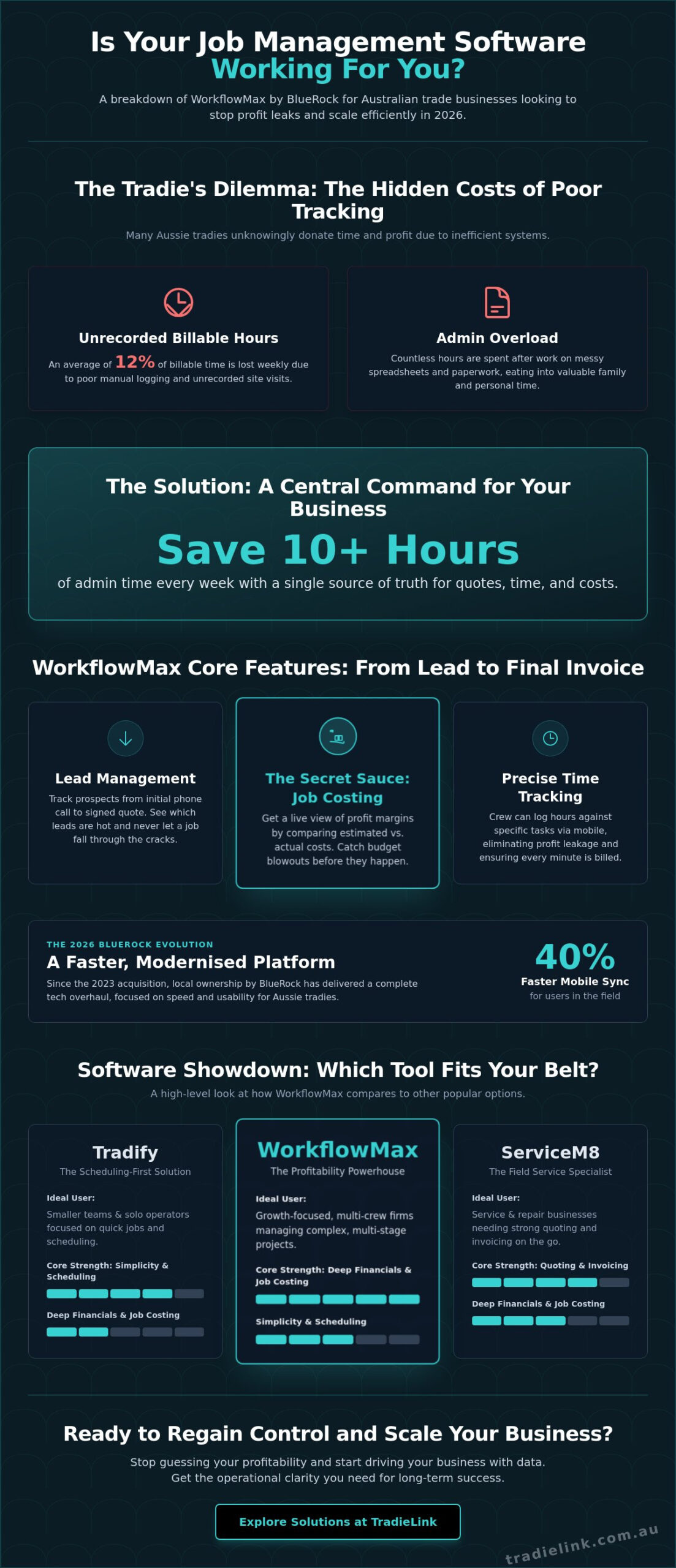
The acquisition of the platform by BlueRock in 2023 was a turning point for the Australian market. By 2026, the benefits of this local ownership are clear. BlueRock committed to a complete overhaul of the technology stack, resulting in a significantly faster experience for users in the field. They introduced a modern user interface that prioritises speed, reducing the number of taps required to log time or upload site photos. Mobile performance was the biggest winner in this evolution, with sync speeds increasing by 40% compared to the legacy versions. Despite these upgrades, the deep integration with Xero remains the gold standard. Your financial data flows between the two systems without manual entry, keeping your bookkeeper happy and your records clean.
Is Your Trade Business Ready for This Level of Software?
Not every business needs this much power. If you’re a solo operator doing three quick call-outs a day, the complexity might outweigh the benefits. However, for multi-crew companies managing large-scale residential or commercial contracts, it’s a necessity. You should expect a learning curve. Most teams take 4 to 6 weeks to fully master the system and integrate it into their daily habits. The payoff is substantial. Firms using the platform report saving an average of 10+ hours of admin time every week. You trade short-term effort for long-term efficiency and a clear path to scaling your headcount without losing your mind. WorkflowMax software is the business engine that drives operational clarity and long-term profitability for the modern Australian trade firm.
Core Features: How WorkflowMax Handles the Daily Grind
The workflowmax software isn’t just a digital filing cabinet. It’s the engine room of your business. For an Aussie tradie, the workday doesn’t start at the site; it starts when the first lead hits your inbox. This platform manages the entire lifecycle of a project, ensuring no detail falls through the cracks while you’re busy on the tools.
Lead management in the system acts as your personal sales assistant. It tracks prospects from that initial “can you give me a look at this” phone call through to a signed, professional quote. You can see exactly which leads are warm and which have gone cold, preventing potential A$5,000 jobs from disappearing because you forgot to follow up. When comparing this to the best project management software on the market, the trade-specific focus on the quote-to-job transition is a clear standout. For sole traders who need a dedicated solution focused purely on capturing and converting enquiries, a purpose-built lead management system for sole trader tradies in Australia can complement your job management platform by ensuring no opportunity slips through the cracks.
Time tracking is where you plug the holes in your bucket. Research shows that tradies lose an average of 12% of billable time every week due to poor manual logging. WorkflowMax allows your crew to log hours directly against specific tasks via their phones. This eliminates “leakage” and ensures every minute spent on-site is accounted for when the final bill goes out. If you want to stop leaving money on the table, you need to optimise your workflow with precise digital tracking.
Mastering the Job Costing Module
Job costing is the secret sauce for maintaining a healthy bank balance. You can input materials and labor costs in real-time, giving you a live view of your profit margins. As the job progresses, the software compares your estimated costs against your actual spend. This feature is vital for catching budget blowouts before they happen. By using historical data from previous 2025 projects, you can create more accurate quotes for 2026, ensuring every new contract is a profitable one.
The Mobile Experience for Tradies On-Site
The mobile app is designed for the reality of a dusty job site or the front seat of a ute. You can manage tasks, update schedules, and capture photos directly into the job folder. This creates an instant paper trail for compliance and variations. For those working on remote Australian sites with patchy reception, the software includes offline mode capabilities. Your data syncs automatically once you’re back in range, meaning you never lose a site note or a signed variation form just because the 5G dropped out.
- Professional Invoicing: Send branded invoices as soon as the job is done to get paid faster.
- Document Storage: Keep all site plans and safety permits in one central location.
- Real-Time Reporting: See exactly which jobs are making money and which are costing you.
WorkflowMax vs. Tradify and ServiceM8: Which Suits Your Trade?
Choosing the right job management tool is like picking the right vehicle for your fleet. You don’t buy a 1-tonne ute if you only need to carry a toolbox, and you don’t buy a van if you’re hauling gravel. Tradify focuses on simplicity and speed. It’s built for the sole trader or small team that needs to fire off a quote on-site and get paid before they leave the driveway. WorkflowMax software targets a different level of complexity. It provides deep financial reporting and granular job costing that simpler apps simply cannot match. If you need to track the exact profitability of a three-month commercial fit-out, WorkflowMax is the superior choice.
ServiceM8 takes a different path by prioritising the “now.” It’s the market leader for scheduling and dispatching. While WorkflowMax excels in the back office, ServiceM8 excels in the van. In the Australian market, pricing structures vary significantly. Most platforms sit between A$40 and A$70 per user per month. ServiceM8 often uses a per-job credit system, which can be cost-effective for low-volume builders but expensive for high-volume maintenance plumbers. WorkflowMax generally sticks to a per-user monthly fee, making your overheads predictable as you scale your team.
- Builders and Landscapers: Thrive on WorkflowMax due to multi-stage project tracking and progress claims.
- Maintenance Plumbers and Sparkies: Often prefer ServiceM8 for its superior mobile interface and GPS dispatching.
- HVAC and Specialist Techs: Frequently land on Tradify for its balance of ease and essential features.
The “Management” vs. “Scheduling” Debate
WorkflowMax wins when your projects have moving parts that span weeks or months. It tracks lead management, quotes, time sheets, and purchase orders in a single, connected stream. ServiceM8 is better for high-volume, quick-turnover service calls where you need to see where your technicians are in real-time. If you find WorkflowMax too heavy but Tradify too light, read our AroFlo Review 2026 to see how that high-power alternative stacks up for Aussie civil and commercial contractors.
Integration Ecosystem
Aussie tradies live and die by their cash flow. Xero and QuickBooks integrations are non-negotiable. WorkflowMax software offers a deep, two-way sync with Xero that handles complex tax requirements and payroll data without manual entry. For larger operations, you can connect secondary tools like Hubspot for CRM or Zendesk for customer support via custom APIs. Your TradieLink profile complements these systems by feeding the lead pipeline. While your software manages the job, your profile ensures there is always a next job to manage, creating a seamless bridge between marketing and operations.
Implementation Guide: Transitioning from Spreadsheets to WorkflowMax
Moving your business from a cluttered Excel sheet to workflowmax software is a major play for any Aussie trade business. It’s the difference between guessing your profit and knowing it to the cent. To make the switch stick, you need a clear plan that doesn’t disrupt your cash flow or your crew’s productivity.
Start with a thorough data audit. Delete those “one-off” clients from 2022 who never called back. Update your material costs based on current January 2026 supplier rates. Once your data is clean, move into your Global Settings. This is where you bake in your 10% GST, upload your company logo for professional quoting, and set staff permissions. You don’t want every apprentice seeing your overheads; keep the sensitive numbers for the office staff.
Use the “Pilot Job” method to test the waters. Pick one upcoming project, perhaps a standard A$8,500 residential rewire, and run it exclusively through the system. This allows you to spot bottlenecks before you migrate all 50 active jobs. Training the crew is the final hurdle. Tradies on-site care about one thing: less paperwork. Show them how the mobile app replaces those crumpled timesheets. When they see it saves them 20 minutes of admin every afternoon, they’ll back the change.
After your first 30 days, sit down and review the numbers. Use the real-time data to see where your margins are thinning. Most businesses find that 15% of their billable hours are lost in travel time that was never captured on spreadsheets. Refine your task categories based on these insights to make your next month even more profitable. While you’re tightening up your digital systems, it’s also worth reviewing how you share your contact details on-site — outdated business cards for tradies are another hidden source of lost leads that a modern digital profile can solve.
Common Implementation Pitfalls to Avoid
The “Garbage In, Garbage Out” rule is non-negotiable. If you import messy data, your reporting will be useless. Avoid over-complicating your task lists early on; stick to five or six main categories rather than 50 tiny ones. A common mistake is failing to reconcile tracked time with actual payroll. If your workflowmax software says a tech worked 38 hours but you paid them for 42, your job costing is already wrong.
Working with a WorkflowMax Partner
If you’re running a crew of more than 12 staff, doing the setup yourself can cost you 40 hours of billable time. An Australian-based implementation specialist understands local tax laws and specific industry quirks. They ensure your integration with Xero is seamless from day one. Investing in a pro setup often pays for itself within three months by eliminating double-handling of data and ensuring every lead is tracked properly.
Scaling Your Trade Business with Software and TradieLink
Workflowmax software acts as the engine for your business operations. It keeps your gears turning and your jobs on track. However, every high-performance engine needs high-quality fuel. For an Aussie trade business, that fuel is a consistent stream of qualified leads. Managing a job efficiently is useless if your schedule has empty gaps that aren’t generating revenue.
By 2026, the gap between just getting by and truly scaling up is defined by how well you integrate your backend systems with your frontend marketing. When you combine the administrative power of job management tools with a strong digital presence, you gain total control over your growth. This professional setup reduces friction during the sales process. You aren’t just another contractor with a ute; you’re a verified professional with the systems to back up your quotes. Clients see the difference in your response times and the clarity of your documentation. To ensure your pipeline stays full, it’s worth investing in a proven approach to marketing for tradies that generates a reliable stream of high-quality local jobs to feed into your new system.
Professional networks and community connections have become the backbone of the 2026 trade industry. Being part of a vetted ecosystem gives you a competitive edge. It allows you to focus on your craft while your digital profile does the heavy lifting of building trust with potential customers before you even arrive on-site for a quote.
Feeding the Machine: Lead Generation for Growth
A steady pipeline makes your software investment pay off. Job management tools work best when they’re busy. If you’re only inputting two jobs a week, you aren’t seeing the full return on investment. Building authority happens before you even pick up the phone. Your TradieLink profile acts as a digital storefront that builds trust while you’re on the tools. It shows clients you’re part of a professional network, which is vital for winning higher-value contracts. For more insights on scaling, check out the Tradies Australia Guide to learn how to build a top-tier business in 2026.
Next Steps: Your 14-Day Action Plan
Don’t let another month slip by with messy paperwork and inconsistent leads. Follow this practical plan to level up your operation.
- Days 1-7: Start your free trial of the workflowmax software. Commit to one hour of setup every evening. Focus on importing your price lists and client contacts first to get the foundation right.
- Days 8-12: Update your TradieLink profile. Upload high-quality photos of your recent work and ensure your service areas are accurate. This reflects your new professional standards and attracts the right type of local work.
- Days 13-14: Run your first live quote through the new system. Track the time saved compared to your old method and notice the professional look of the final document.
Success in the modern trade industry requires both visibility and efficiency. You’ve got the skills on-site; now it’s time to match them with your business systems. Optimise your trade business today with a TradieLink Profile and start feeding your business the leads it deserves.
Stop Letting Paperwork Eat Your Weekends
Transitioning to workflowmax software in 2026 is the fastest way to ditch messy spreadsheets and reclaim your time. You now understand how this tool handles the daily grind and how it compares to other big names like Tradify or ServiceM8. By centralising your quotes and invoices, you can cut your weekly admin time by 15 percent or more. It’s the move you need to make if you’re serious about scaling your trade business this year. This digital shift ensures your operations are professional, efficient, and ready for growth. If you are also looking to boost your team’s professional communication skills for corporate clients, Lingua Learn Vietnam provides accessible online language certifications that add another layer of professionalism to your business.
Once your office side is sorted, you’ll need the work to match your new capacity. TradieLink is built for the local trade industry and is already trusted by thousands of Australian tradies. Our platform seamlessly integrates with your professional digital profile to keep you in front of local clients. Join TradieLink to get more leads for your new workflow and take the stress out of finding your next job. You’ve done the hard yards on the tools, so let us help you build a business that works as hard as you do.
Frequently Asked Questions
Is WorkflowMax still owned by Xero in 2026?
No, Xero officially handed over the brand to BlueRock in 2023, and the new version of the platform has been fully independent since June 2024. BlueRock rebuilt the system from the ground up to ensure it stays modern and fast. You are now supported by an Australian owned company that focuses specifically on job management for the trade industry.
How much does WorkflowMax software cost for a small trade business?
Pricing for the workflowmax software operates on a monthly subscription model based on the number of users in your business. For a small trade setup with 1 to 3 users, prices typically start at A$55 per month. As your team grows, the cost per user decreases, allowing you to scale your admin costs as you win more work.
Can I use WorkflowMax on my iPhone or Android at the job site?
Yes, you can access the full suite of mobile features through dedicated apps available on the Apple App Store and Google Play Store. Tradies use the app to log hours, view job notes, and upload site photos directly from their phones. It syncs instantly with the office, so your admin team sees exactly what is happening on-site without a phone call.
Does WorkflowMax handle payroll for my employees?
The software does not process payroll payments directly. It acts as a powerful time tracking engine that records every billable minute on the tools. You then push this verified time data into Xero Payroll with one click. This connection ensures your staff get paid correctly for the 40 hours they worked without you manually typing data into a spreadsheet.
What is the difference between WorkflowMax and Xero Projects?
WorkflowMax is a heavy duty job management tool, whereas Xero Projects is a simplified tracker for basic expenses. If you need to manage complex quotes, detailed purchase orders, and a sales pipeline, the workflowmax software is the right choice. Xero Projects is better suited for solo operators who only need to track basic time against a single invoice.
How long does it take to set up WorkflowMax for a plumbing or electrical business?
Most trade businesses are up and running within 14 to 28 days. This period includes the time needed to customise your quote templates and get your staff comfortable with the mobile app. If you have a clean list of clients and parts, the technical import usually takes less than 3 hours, but the full transition requires a few weeks of consistent use.
Can I import my existing client data from Excel into WorkflowMax?
You can definitely import your existing data using CSV files. This includes your client contact lists, supplier details, and your full price list of materials. Transitioning from an Excel based system is a standard part of the onboarding process, and it prevents you from having to manually enter hundreds of contact records one by one.
Is there Australian-based support for WorkflowMax users?
Yes, BlueRock provides local support with their main operations based in Melbourne. This means you can access help during Australian business hours instead of waiting for an overseas call centre to wake up. They offer a mix of live chat, email support, and a detailed knowledge base designed specifically for the local market.