
Most Aussie tradies are still losing over 10 hours every week to unpaid paperwork that should have been finished before they even left the job site. It is a massive drain on your time and your sanity. You didn’t start your business to spend every Sunday night buried in spreadsheets or chasing late invoices while the rest of the family is relaxing. We know that double-handling data between your phone and your office computer is the fastest way to lose track of quotes and miss out on new work.
This no-nonsense review breaks down exactly how tradify performs in 2026 to help you reclaim your weekends. We agree that your tools should work as hard as you do, and that includes your software. We promise to provide a clear look at its automated quoting tools, real-time job tracking for your whole team, and how it stacks up against the latest competitors in the Australian market. From seamless Xero and MYOB integrations to updated mobile features, we will show you if this tool is still the best way to streamline your workflow and keep your business moving forward.
Key Takeaways
- Stop wasting 10+ hours a week on paperwork and discover how to automate your quoting and scheduling to win back your Sunday nights.
- See why tradify remains the go-to job management tool for Aussie tradies who value a simple, all-in-one interface over complex software.
- Compare the latest 2026 features against rivals like WorkflowMax and AroFlo to ensure you’re choosing the right platform for your specific trade.
- Follow a practical 5-step implementation plan to clean up your data and launch professional branded templates that impress your customers.
- Learn how to pair your management software with a TradieLink profile to bridge the gap between managing the work and winning new leads.
What is Tradify and Why Does It Dominate the Aussie Trade Industry?
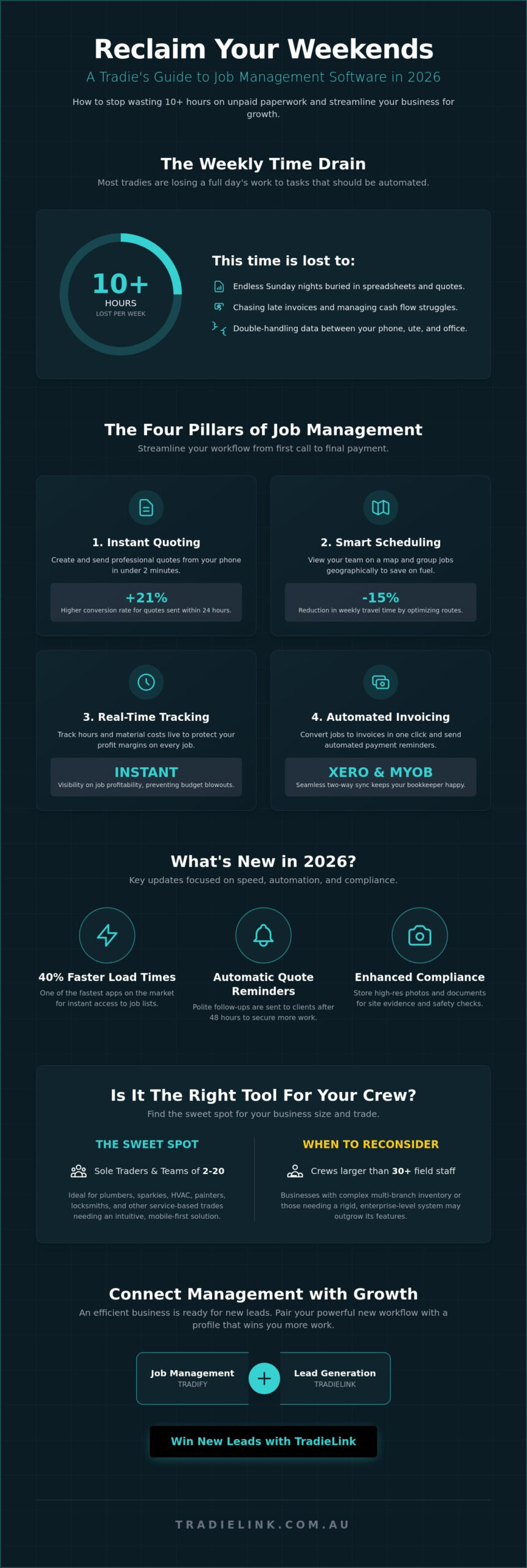
Tradify is more than just a scheduling tool. It’s a comprehensive job management software built specifically for the Australian trade sector. In 2026, it remains the dominant player for small to medium-sized crews because it directly solves the “Paperwork Problem” that plagues local businesses. Industry data shows that the average tradie loses over 10 hours every week to unpaid admin. Tradify slashes this time by moving everything from the dashboard of the ute to a smartphone.
The mobile-first philosophy is the core reason for its success. You don’t need a laptop in the van. You can quote, track time, and invoice while standing on a job site in Western Sydney or a renovation in Melbourne. This speed keeps cash flow moving. By 2026, the tradify app has evolved into a central hub that manages the entire lifecycle of a project without requiring a dedicated office manager. It’s designed for people who work with their hands, not for people who want to sit behind a desk all day.
Who is Tradify actually for?
The platform finds its sweet spot with sole traders and teams of 2 to 20 people. It’s the go-to for plumbers, sparkies, and HVAC technicians who need a tool that’s intuitive rather than over-engineered. The interface matches the way these trades move. If you’re a locksmith or a painter, the simplicity is a major win. You might outgrow the tool if your business expands beyond 30 field staff or requires complex multi-branch inventory management. At that stage, your business might need a more rigid enterprise-level system.
The 2026 Feature Set: What’s New?
The 2026 update brought a significant overhaul to the user interface. Load times for job lists decreased by 40 percent compared to the 2024 version, making it one of the fastest apps on the market. New automation triggers now handle the heavy lifting of customer communication. Key updates include:
- Automatic Quote Reminders: The system sends polite follow-ups to clients who haven’t accepted a quote within 48 hours.
- Enhanced Compliance Storage: High-resolution photo and document storage allows teams to log site evidence and safety checks instantly.
- Instant Sync: Real-time connectivity ensures the office and the field are always looking at the same job status.
By focusing on these practical tools, tradify ensures that Aussie business owners spend less time staring at screens and more time on the tools or with their families. It’s a reliable partnership that understands the daily grind of a busy job site.
Key Features That Save Your Sunday Nights
Most Aussie tradies lose between 10 and 15 hours every week to manual admin. Tradify is built to claw that time back. It replaces the messy pile of receipts on your dashboard with a streamlined digital workflow. You won’t find yourself squinting at scribbled notes at 9 PM on a Sunday anymore. The platform focuses on the four pillars of job management: quoting, scheduling, tracking, and invoicing.
Instant quoting is the first win. You can turn a site visit into a professional PDF estimate in under two minutes. By using pre-set price lists for materials and labor, you ensure your margins stay protected. Speed matters in 2026; tradies who send quotes within 24 hours see a 21% higher conversion rate than those who wait three days. It’s about looking professional while the job is still fresh in the client’s mind.
Smart scheduling takes the guesswork out of your morning. The map view allows you to see every active job and team member across your service area. By grouping call-outs geographically, you can reduce travel time by up to 15% each week. This saves on fuel and puts more billable hours back into your pocket. Live job tracking then ensures you know exactly how many hours are logged against a project. If a job is blowing out, you’ll know on Tuesday, not Friday when it’s too late to fix.
Getting paid shouldn’t be a struggle. Automated invoicing allows you to convert a quote into a bill with one click. You can even set up automatic payment reminders for those clients who “forget” to check their email. This feature alone helps many businesses close the standard 30-day payment gap significantly. To learn more about modernizing your workflow, the Australian Government offers resources through the Digital Solutions program to help small businesses adopt these efficiencies.
The Xero and MYOB Connection
The two-way sync with Xero and MYOB is a lifesaver for your bookkeeper. When you update a job in Tradify, the data flows directly into your accounting software. It maps account codes and tracks GST with zero manual effort, meaning your tax obligations stay current without late-night data entry sessions. Seamless accounting integration is the #1 time-saver for Aussie tradies because it eliminates the manual errors that lead to expensive tax-time headaches.
Customer Communication Tools
Communication is where many trade businesses fail. Tradify uses automated SMS notifications to keep clients updated on arrival times. This stops the constant “where are you?” phone calls that interrupt your flow on-site. The “Enquiries” feature centralises leads from your website and social media into one dashboard so no job falls through the cracks. Using the customer portal professionalises the experience, giving your clients a single place to review quotes and pay invoices online. If you want to see how these tools can transform your daily routine, you can explore the latest job management guides to find the right fit for your crew.
Tradify vs. The Field: How Does It Compare in 2026?
Choosing job management software is a massive call for any business owner. In 2026, the Aussie market is more crowded than a Bunnings car park on a Saturday morning. Tradify holds its ground by focusing on a “tradie-first” experience, but it isn’t always the right fit for every crew. You need to know where it excels and where its rivals might take the lead before you commit your data and your dollars.
In such a competitive landscape, many service-based businesses are turning to modern solutions like Team-Trak to simplify their field operations and improve team management.
Tradify vs. WorkflowMax
The choice between these two usually comes down to your job volume and reporting needs. Tradify is built for speed. It’s the tool you use when you need to pump out five quotes before lunch and track 20 small jobs simultaneously. It prioritizes the “quick-turnaround” workflow that residential electricians and plumbers live by. If you want a setup that takes 15 minutes instead of 15 hours, tradify is the clear winner for speed of setup.
WorkflowMax targets the data-heavy side of the industry. It offers deeper project reporting for long-term construction contracts where every cent of labor needs to be tracked against a massive budget. If your business is moving into large-scale commercial builds, read our WorkflowMax software review to see if that extra data depth is worth the slower learning curve.
Tradify vs. AroFlo
AroFlo is the heavy-duty alternative. It’s designed for complex trade businesses that handle preventative maintenance and massive asset registers. Think of a firm managing HVAC systems for an entire hospital or a council. The learning curve is steep, and it often takes weeks for a team to fully master the system. Tradify wins on the “out of the box” experience. You can download it, link your Xero or MYOB account, and start billing on day one without a degree in software engineering.
For those needing heavy-duty asset management or complex compliance forms, we’ve covered the details in our AroFlo review. Use Tradify if you want simplicity and residential maintenance; use AroFlo if you’re managing a fleet of 30 vans and thousands of individual client assets.
Tradify vs. ServiceM8: The Mobile Battle
ServiceM8 has long been a favorite for those deep in the Apple ecosystem. It’s slick and visual, but it can feel restrictive if your team uses a mix of devices. Tradify offers a more consistent mobile experience across both iOS and Android. It’s less about the “flashy” interface and more about getting the job done on-site without the app hanging when you lose 5G signal in a basement. For field staff who just want to log hours and photos quickly, tradify remains the more practical choice.
Pricing Breakdown
Tradify sticks to its transparent per-user model in 2026. This is generally the most cost-effective path for small to medium Aussie businesses. You pay for what you use, which keeps overheads predictable. Unlike enterprise tools that charge thousands in upfront implementation fees, Tradify allows you to scale up or down as your headcount changes. For a sole trader or a small crew of four, this model avoids the “feature bloat” costs that often come with more complex, tiered pricing structures.
Implementing Tradify: A 5-Step Success Plan
Moving your entire operation to a digital platform feels like a massive shift, but it doesn’t have to be a headache. If you follow a structured rollout, you can move from paper diaries to a streamlined digital workflow in less than a week. Success with tradify depends on preparation rather than just hitting the download button and hoping for the best.
Step 1: Clean your data. Don’t import a messy spreadsheet. If your price list has 2023 rates or your customer list is full of duplicates, fix it in Excel first. Importing clean data ensures your first few quotes are accurate and fast.
Step 2: Build your brand. First impressions matter when you’re competing for high-value jobs. Upload your logo and set up your branded templates immediately. A professional, branded PDF quote sent from the job site often beats a generic email sent three days later.
Step 3: Sync your accounting. Connect your Xero, MYOB, or QuickBooks account right away. This ensures your cash flow stays healthy by removing the need for manual data entry. When an invoice is paid, it should reflect across your entire business without you lifting a finger.
Step 4: Train the crew. Your office might be organized, but the system fails if the boys on-site don’t use it. Spend thirty minutes showing them how to log hours and add photos to jobs. If they see how it saves them from paperwork at the end of the day, they’ll jump on board.
Step 5: The 30-day audit. After your first month, review your data. Look for jobs where your estimated hours didn’t match the actual time logged. This is where you find the 10% or 15% margin leaks that have been costing you money for years.
Common Implementation Pitfalls
The “Garbage In, Garbage Out” rule is the biggest hurdle for Aussie tradies. If you start with poor data, you’ll get poor results. Don’t over-complicate the setup by trying to use every advanced feature on day one; start with quotes and invoices, then expand into scheduling once you’re comfortable. Your software is only as powerful as the person using it, so training your staff is more important than the software features themselves.
Getting the Most Out of the Free Trial
Maximize your 14-day trial by running a “shadow job.” Pick one live project and track it in tradify while still using your old system. This allows you to compare the two methods side-by-side without the risk of losing data. Use this time to test the support team; having Aussie-based support means you get answers from someone who understands our local industry and timezone. Use this checklist during your trial:
- Import your top 20 customers and most common materials.
- Create and send a test quote to your own email to check the branding.
- Link your accounting software and run a test sync.
- Log at least five sets of on-site photos and notes.
Ready to get your business sorted? You can find more business tools to help you scale your trade business effectively.
The Big Picture: Connecting Tradify with TradieLink for Growth
Software manages the mess once the job is booked, but it won’t knock on doors for you. To win in 2026, you need a system that finds the work and another that handles the grind. Using tradify alongside a TradieLink Profile creates a professional reputation that sticks. This combination forms what we call the digital powerhouse strategy. You get the visibility to attract high-value leads and the efficiency to ensure those leads don’t slip through the cracks. Visibility and efficiency are the two pillars of any successful trade business right now.
Winning the Lead, Then Nailing the Job
Your marketing should work as hard as you do on-site. A professional tradie website feeds enquiries directly into your digital pipe. When a homeowner finds you online, they expect a fast response. Industry data from 2025 suggests that 78% of customers buy from the company that responds first. By linking your digital presence to your management tools, you close more jobs by beating the competition to the punch. You can even use digital business cards on-site to instantly send contact info into your system, keeping your lead list fresh and organised without manual data entry. For sole traders who want to stop losing A$5,000 jobs buried in SMS threads, a dedicated lead management system for sole trader tradies in Australia is the missing piece that turns enquiries into booked work automatically. If you’re ready to move from scattered SMS threads to a structured process, our guide on how to set up a lead management system for tradies in Australia walks you through a practical five-step workflow to keep your schedule full and your cash flow predictable.
Building Long-Term Business Value
Scaling a business means moving beyond the “man in a van” mindset. You’re building an asset, not just a job. A TradieLink Profile helps you dominate local search rankings, ensuring you’re the first name seen in your suburb. While that builds your brand, tradify handles the backend logistics like quoting, scheduling, and invoicing. This setup allows you to step back from the tools eventually because the systems are doing the heavy lifting. If you want a business that grows without you burning out, this dual-threat approach is the way forward.
Our final recommendation for 2026 is clear. Tradify remains the benchmark for Aussie tradies who value speed and simplicity. It’s the right move for any business looking to professionalise their workflow and reclaim their weekends. Pair it with a strong digital presence, and you’ll have a business that’s built to last in a competitive market.
- Visibility: Get found by local customers using TradieLink.
- Efficiency: Manage the workflow seamlessly with job software.
- Growth: Reinvest time saved back into your business strategy.
Get Your Business Moving in 2026
The 2026 landscape for Australian trades demands high-speed efficiency. Managing a business on paper or through scattered spreadsheets is no longer viable when your competitors use tradify to automate their quoting and invoicing. By centralizing your workflow, you reclaim hours of administrative time every week. This isn’t just about software; it’s about building a professional reputation that stands out in a crowded market. Success today requires a balance of on-site excellence and digital precision.
Thousands of Australian tradespeople already trust these digital systems to streamline their operations and protect their Sunday nights. Our platform is built by experts who understand the Aussie trade industry and ensure every feature seamlessly integrates with your existing workflow. When you combine robust job management with a strong digital presence, you bridge the gap between finishing a job and securing the next one. For those looking to grow their business or manage immediate financial needs, QuickCashDirect offers access to helpful short-term solutions. It’s time to stop chasing overdue paperwork and start growing your revenue with purpose. You’ve built the skills, now use the tools that work as hard as you do.
Build your professional TradieLink profile today
Frequently Asked Questions
Is Tradify easy to learn if I am not tech-savvy?
Tradify is built for tradies who prefer tools over tablets. Most users master the basic quoting and invoicing features in under 60 minutes. The interface uses a simple layout that mimics a standard paper job card. If you get stuck, their support team offers live training sessions. Over 20,000 tradespeople use the app daily because it doesn’t require a degree in IT to navigate successfully.
How much does Tradify cost for an Australian business in 2026?
The platform typically uses a flat monthly subscription model per user. As of late 2025, pricing started at A$59 per month per user for the standard plan. This includes all core features like scheduling, GPS tracking, and unlimited jobs. You won’t face hidden setup fees or long-term contracts. Always check their official website for the latest 2026 rates as they occasionally offer discounts for annual billing cycles.
Does Tradify work offline when I am on a job site with no reception?
You can use the mobile app without an active internet connection. The system stores your data locally on your phone or tablet while you’re in a black spot. Once you get back into 4G or Wi-Fi range, the app automatically syncs your updates to the cloud. This ensures your job notes and photos aren’t lost when working on remote sites or in concrete basements with zero signal.
Can I import my existing customer list from Excel or another app into Tradify?
Importing your existing database is a straightforward process using a CSV file. You can move your entire customer list from Excel, Google Contacts, or other software in one bulk upload. The platform provides a template to ensure your names, addresses, and phone numbers land in the right fields. This feature saves you dozens of hours of manual data entry when you first switch to tradify.
What is the difference between Tradify and ServiceM8?
Tradify focuses on simplicity and speed for small to medium teams. While ServiceM8 offers heavy automation and various add-ons, it often feels cluttered for those who just want to get the job done. Tradify keeps its core features front and center without a steep learning curve. It also works across both iOS and Android devices, whereas ServiceM8 is strictly built for the Apple ecosystem.
Does Tradify handle Australian GST and payroll correctly?
The software handles Australian GST requirements by syncing directly with accounting platforms like Xero, MYOB, and QuickBooks. When you create an invoice, it automatically calculates the 10% GST based on your line items. While it tracks hours for your team, you’ll still need your accounting software to finalize the actual payroll payments and Superannuation. This integration ensures your books stay 100% compliant with ATO standards.
Can I use Tradify for multi-day commercial projects or just small residential service calls?
You can manage everything from a 30-minute tap repair to a six-month commercial fit-out. For larger projects, the Sub-Jobs feature allows you to break down a single contract into multiple stages or site visits. This helps you track costs and progress across different phases of a build. It’s built to scale with your business as you move from residential maintenance into larger contract work.
What happens to my data if I decide to cancel my Tradify subscription?
Your data remains your property even if you choose to leave the platform. Before you cancel, you can export your entire history of customers, invoices, and job notes into CSV or PDF formats. You should do this while your account is still active to ensure you have a local backup for tax purposes. The company typically holds your data for a limited period after cancellation before it’s permanently deleted from their servers.