

How many Saturdays have you traded for a kitchen table covered in receipts and a calculator that won’t stop blinking? You know the drill. Spending four hours on a detailed estimate only to lose the job because a competitor emailed their bid two days earlier is a massive blow to your momentum. Even worse is winning the contract, then realizing a manual error or a 12% spike in material costs just wiped out your entire profit margin. It’s a cycle that makes finding the right quoting software for small builders a necessity rather than a luxury for any serious Aussie tradie.
We’ve vetted the top tools for 2026 to help you send professional quotes in minutes, automate your takeoffs, and keep your books clean with Xero. This guide breaks down exactly which platforms provide the best bang for your buck so you can get off the tools and back to what matters. You’ll learn how to protect your margins with live pricing and streamline your workflow with software that actually fits the way you work on-site.
Key Takeaways
- Stop losing your Sunday nights to manual spreadsheets and learn how to reclaim your weekends while increasing your professional win rate.
- Identify the essential features in quoting software for small builders that safeguard your profit margins and slash estimation time.
- Follow a step-by-step implementation guide to set up your digital price book and ensure your project data is accurate from day one.
- Compare the leading software options in the Australian market to find a solution that matches your crew’s specific needs and project volume.
- Learn how to link your quoting tools with a broader digital ecosystem to streamline your workflow and drive more quality leads for your business.
Why Small Builders Are Trading Spreadsheets for Quoting Software in 2026
Sunday night shouldn’t be spent hunched over a laptop while the rest of the house is asleep. For years, the “Sunday Night Slump” was a badge of honour for Aussie tradies, a sign of a busy pipeline. By 2026, this habit is a liability. Relying on manual data entry means you’re essentially working for free during your downtime. Modern quoting software for small builders has shifted from a luxury tool to a survival requirement. If you’re still using Excel templates from 2015, you’re likely bleeding profit before the first shovel hits the dirt. The Australian residential sector has moved toward cloud-based systems that offer real-time updates, making static spreadsheets look like relics of a slower era.
Reclaiming those lost hours isn’t just about business growth; it’s about having the freedom to pursue a social life, whether that’s a night out with mates or browsing specialized communities like Redhead Dates to find a meaningful connection.
The transition isn’t just about saving a few hours. It’s about accuracy in a market where margins are tighter than ever. Construction estimating software provides a safety net that manual systems can’t match. In 2026, the builders winning the best contracts aren’t necessarily the ones with the lowest price; they’re the ones who show they have total control over their numbers. Moving away from error-prone templates ensures your business stays resilient against price hikes and scheduling shifts.
The Hidden Cost of Manual Estimating
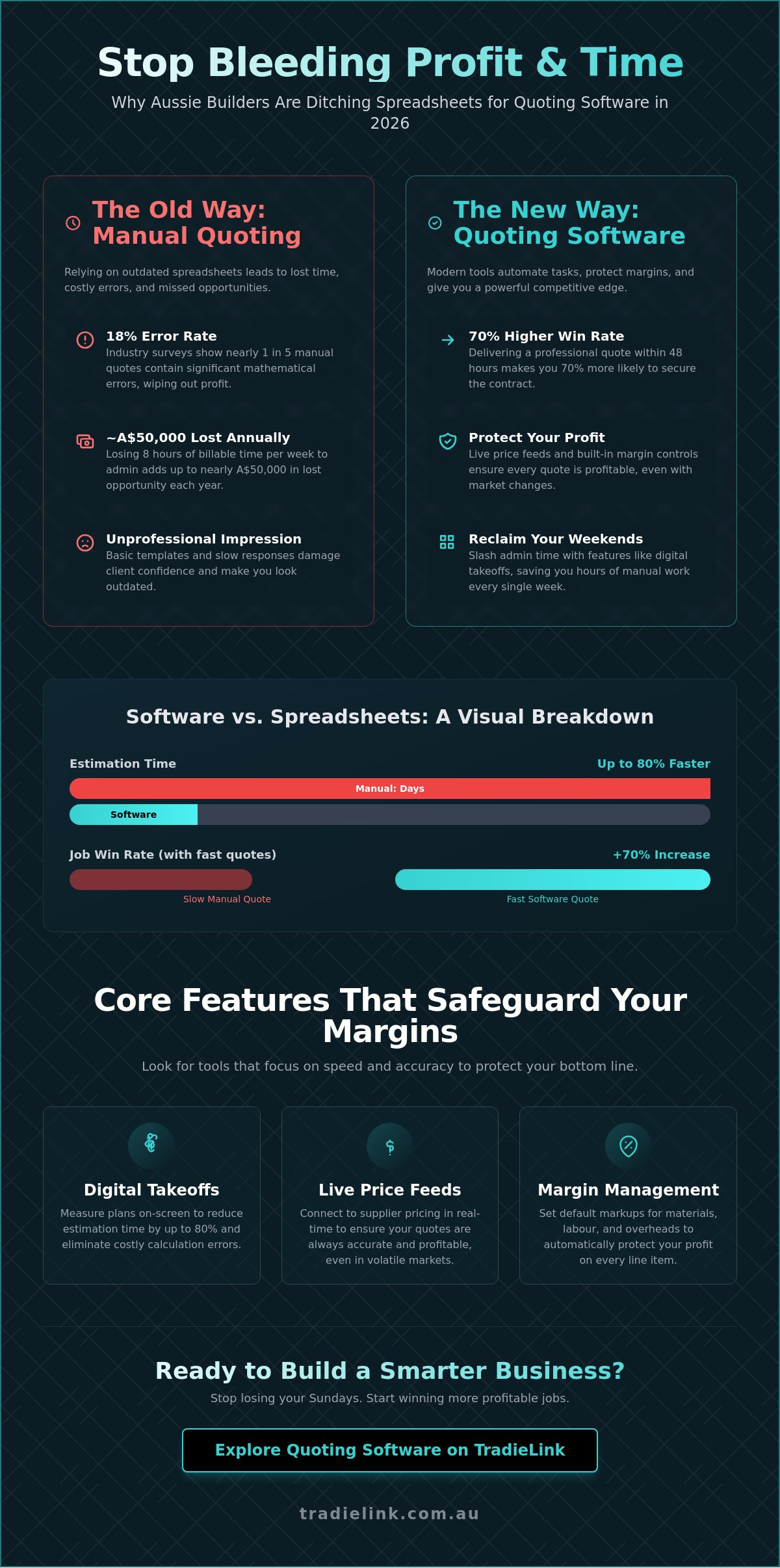
Think about your hourly rate on-site. If you charge A$120 per hour but spend eight hours every week on manual admin, you’re effectively losing A$960 in billable time weekly. That adds up to nearly A$50,000 a year in lost opportunity. Beyond the time, there’s the risk of “the forgotten line item.” A 2025 industry survey found that 18% of manual quotes contained at least one significant mathematical error. A single missed delivery fee or an outdated price for structural timber can wipe out your entire project margin. With Australian material costs remaining volatile, relying on a spreadsheet that doesn’t sync with live supplier lists is a massive gamble.
Professionalism as a Competitive Edge
First impressions happen long before you pick up a tool. A branded, digital quote looks professional and instils immediate confidence in high-end clients. It shows you’re a modern professional, not just someone scribbling numbers on a notepad. Using quoting software for small builders allows you to provide transparent, itemised breakdowns that build trust. When a client sees exactly where their A$300,000 investment is going, they’re less likely to haggle. Speed is the other factor. Data shows that builders who deliver a quote within 48 hours of a site visit are 70% more likely to secure the contract. Software lets you hit that target every time, leaving competitors in the dust.
Core Features That Protect Your Profit Margins
Small crews don’t have time for bloated software. You need a tool that handles the heavy lifting without the fluff. The best quoting software for small builders focuses on two things: speed and accuracy. If a feature doesn’t directly protect your bottom line, it’s just noise. One essential tool is the live material price feed. In the Australian market, timber and steel prices can fluctuate by 10% in a single quarter. Integrated feeds from local suppliers mean your quotes reflect real-world costs, not outdated estimates from last year.
Every minute spent on admin is a minute you aren’t on-site or finding new leads. High-performing tradies use software to automate the boring stuff while keeping a tight grip on the numbers. This isn’t just about making life easier; it’s about ensuring your business stays viable as material costs and labour rates shift.
Digital Takeoffs and Estimating
Digital Takeoff is the process of measuring digital plans to calculate material quantities. Moving from scale rulers to on-screen measurements isn’t just about looking modern. It’s about precision. Digital transformation and technology adoption has shown that builders using on-screen tools can reduce takeoff time by up to 80%. This speed allows you to get more bids out without working every Sunday night.
- Eliminate manual entry errors that lead to expensive over-ordering.
- Reduce material waste by calculating exact linear metres and square meterage from PDF plans.
- Update quantities instantly when the client changes the floor plan layout.
Margin Management and Variation Tracking
Profit margins often disappear through death by a thousand cuts. You need a system that locks in your overheads. Set your default markups, whether it’s 20% or 30%, to ensure every quote remains profitable after the bills are paid. If you aren’t tracking variations, you’re giving away free labour. Modern quoting software for small builders lets you handle changes on-site via mobile. When a client asks for a different tile or an extra wall, generate a variation and get an electronic sign-off before the work begins.
Real-time job costing is the final piece of the puzzle. It lets you compare your A$75,000 estimate against your actual spend as invoices roll in. This visibility keeps you in control of your cash flow and helps you spot budget blowouts before they become disasters. If you want to stop the guesswork and start scaling, it’s time to optimise your workflow with tools built for the Australian trade. Professionalism on the job site should be matched by the precision of your paperwork.
Comparing Top Quoting Solutions for the Australian Market
Choosing the right quoting software for small builders isn’t just about the monthly price tag. It’s about how much time you get back on the weekend. In 2026, the Australian market offers tools ranging from simple invoice generators to full-scale project management suites. You must match the software’s complexity to your annual turnover. A solo chippy doing A$200,000 in renovations has different needs than a small team managing five new builds simultaneously.
The “ecosystem” approach is now the industry standard. Your quoting tool shouldn’t live on an island. It needs to talk to your accounting package to prevent double-entry errors and missed variations. A 2025 industry survey showed that builders using integrated systems reduced their administrative errors by 40%. Finding that balance between power and ease of use is the key to a high ROI. If a tool saves you four hours of admin a week, it pays for itself in a single afternoon.
Specialised Building Software: Buildxact and MyConstruct
Buildxact remains a dominant force for builders who need integrated takeoffs and scheduling. It’s designed to handle the heavy lifting of a bill of quantities. By pulling data directly from digital plans, it slashes quoting time by roughly 80% compared to traditional manual spreadsheets. It’s a powerhouse for those managing mid-to-large residential projects where accuracy is non-negotiable.
MyConstruct is a solid Australian-made option that understands the local landscape. It’s built specifically for residential specialists who need to manage workflows without a steep learning curve. For those looking at emerging players in 2026, Wunderbuild and NextMinute are gaining ground. Wunderbuild offers a highly intuitive mobile interface. NextMinute focuses on the job management side, making it a favorite for builders who handle a mix of maintenance and small builds.
Accounting-First Solutions: Xero and QuickBooks
Many tradies start with the quoting tools built into Xero or QuickBooks. If you’re only doing one or two simple quotes a month, this basic approach is often enough. It keeps your finances in a single source of truth, making BAS time a breeze. You don’t have to worry about syncing data because it’s already where your accountant needs it. It’s a low-cost way to keep your business professional from day one.
However, most builders eventually outgrow these tools. Accounting apps don’t handle complex takeoffs or material price fluctuations well. Once your business passes the A$500,000 annual revenue mark, the lack of project-specific features becomes a bottleneck. You’ll likely need a dedicated quoting software for small builders that pushes data to Xero, rather than relying on an accounting app to do the heavy lifting of a construction estimate.
- Buildxact: Best for integrated takeoffs and scheduling.
- MyConstruct: Reliable local support and residential focus.
- Xero/QuickBooks: Ideal for low-volume, simple quoting.
- Wunderbuild: Great for mobile-first site management.
The Builder’s Implementation Guide: From Setup to First Quote
Buying the right quoting software for small builders is only half the battle. The real work starts during implementation. Software won’t fix a messy business; it only makes a clean business move faster. Before you upload a single file, clean up your data. Delete old, inactive contacts and outdated material lists. Your new system is only as reliable as the inputs you provide. If you start with accurate data, you’ll produce professional quotes in minutes rather than hours.
Success requires the 48-hour rule. Commit to a hard 48-hour window to learn the basics without jumping back into your old spreadsheets. This focused period prevents you from falling back on bad habits when a job gets stressful. Integrating this tech effectively is a core part of a modern tradies australia business strategy. It turns your office work from a bottleneck into a competitive advantage that helps you scale without the usual administrative headaches.
Step 1: Standardise Your Cost Items
Stop reinventing the wheel for every job. A Price Book is your library of material and labour costs. Instead of adding every screw and stud individually, create “recipes” or assemblies. For a standard 2.4m stud wall, build an assembly that includes timber, fixings, and 0.5 hours of labour per metre. Import CSV price lists from your main suppliers like Greenhill Timbers, Bunnings, or Reece to keep your estimates current. This ensures your margins don’t get eaten by the 4.2% annual rise in material costs recently reported in Australian construction data.
- Group common tasks into assemblies to save hours on manual data entry.
- Update supplier pricing monthly to maintain A$ accuracy across all projects.
- Assign specific labour rates to different team skill levels to track true profitability.
Step 2: Customise Your Quote Templates
First impressions win contracts. Customise your quoting software for small builders with your logo, ABN, and builder’s license number. Professional branding can increase quote conversion by 15% compared to plain text emails. Don’t overlook the fine print. Include clear Terms and Conditions to protect your liability regarding site access, variations, and payment schedules. Finally, set up automated follow-ups. Most builders lose work because they forget to check in. Setting a reminder for 3 days after sending a quote ensures you stay top of mind for the client.
Ready to streamline your workflow and win more work? Build a more professional trade business with TradieLink.
Beyond the Quote: Building a Complete Digital Ecosystem with TradieLink
Picking the right quoting software for small builders is a massive win for your efficiency, but it’s only half the battle. A professional quote means nothing if you aren’t winning the right leads to send it to. True business growth happens when you connect your back-office systems with a powerful front-end presence. You need a system where your reputation does the heavy lifting before you even pick up the tape measure. TradieLink isn’t just another directory. It’s a tool built to help Australian builders reclaim their nights and weekends. By integrating your quoting process with a high-visibility profile, you create a seamless loop. You generate interest, capture the lead, and deliver a professional estimate that reflects the quality of your work. It’s about making technology work for you, ensuring you spend less time chasing paper and more time on-site or with your family.
Showcasing Your Professionalism
Your TradieLink profile acts as your 24/7 digital showroom. Don’t just tell clients you’re good; show them. You can host high-resolution galleries of your quoted projects, giving prospects a clear look at your finishing standards. This transparency builds immediate trust. In the 2026 market, homeowners value clear communication as much as the build itself. Collecting reviews that highlight your transparent pricing and punctuality gives you a competitive edge. Use your digital business card to capture lead details instantly while on-site. This stops you from losing contact info on the back of a timber offcut. It’s professional, fast, and ensures no opportunity slips through the cracks.
- Host galleries: Display completed projects to prove your expertise and quality.
- Verified reviews: Highlight your clear communication and honest pricing to win trust early.
- Digital business card: Capture lead data on your phone and sync it immediately to your workflow.
Next Steps for Your Building Business
Start by auditing your current workflow. If you’re losing more than 10 hours a week to manual data entry or chasing leads, you’re burning profit. A builder charging A$100 per hour is effectively losing A$1,000 every single week just on admin. Transitioning to a digital-first approach isn’t just about software; it’s about business maturity. Integrating high-quality quoting software for small builders with a lead management platform ensures you never miss a beat. It’s time to stop being a slave to your spreadsheet and start running a business that scales.
- Calculate your hourly rate against your admin time to see the true cost of inefficiency.
- Set up your TradieLink profile to increase your national visibility among Australian homeowners.
- Claim your TradieLink profile and start managing your leads professionally today.
Future-Proof Your Building Business Today
The days of scribbling on timber offcuts or wrestling with broken Excel formulas are over. By 2026, the Australian building industry will move faster than ever, making digital precision a requirement rather than a luxury. Adopting the right quoting software for small builders ensures your margins stay protected against shifting material costs and labor shortages. Research indicates that builders using integrated digital tools save an average of 15 hours on admin every week. It’s about working smarter to keep your pipeline full and your site running smoothly.
Winning the job is only half the battle; you need a digital presence that works as hard as you do. TradieLink is an Australian-owned and operated platform built specifically for local tradies. We offer an all-in-one lead management and digital business card system that’s already trusted by builders across Australia to grow their digital footprint. Don’t let paperwork hold your growth back when you could be focusing on your craft instead.
Build a professional brand and manage your leads with a TradieLink Profile
We’re ready to help you level up your business and secure that next big contract with confidence.
Frequently Asked Questions
Is quoting software worth it for a solo builder or small crew?
Yes, investing in quoting software for small builders is worth it because it typically recovers 10 to 15 hours of admin time every week. For a solo builder, this means you can get home earlier or fit in another site visit. Most small crews see a 25% increase in quote accuracy by using pre-set templates instead of manual calculations. It stops profit bleed on materials and ensures you aren’t working for free.
How long does it take to learn new quoting software while working on-site?
You’ll reach basic proficiency within 3 to 5 days of consistent use. Most modern platforms offer 15 minute micro-learning videos designed for tradies on their lunch break. If you spend 20 minutes each evening for a week, you’ll be sending professional quotes from your tablet by Friday. It’s built for the job site, not a classroom, so the interface is intuitive and direct.
Can I integrate my quoting software with Xero or MYOB?
Yes, 90% of top-tier construction platforms in 2026 offer one-click sync with Xero and MYOB. This integration eliminates double-handling by pushing your accepted quotes directly into your accounting system as invoices or purchase orders. It keeps your bookkeeper happy and ensures your cash flow records stay accurate without manual data entry. You’ll save roughly 4 hours of data entry per project by linking these systems.
Does quoting software include digital takeoffs for Australian building plans?
Yes, most mid-range and premium versions include digital takeoff tools that handle Australian PDF and CAD plans. You can measure areas, perimeters, and volumes directly on your screen with 99% accuracy. This replaces the old scale ruler and highlighter method. Using digital takeoffs for Australian plans reduces estimation errors by 15% on average, ensuring your material orders match the site requirements exactly.
What is the average cost of quoting software for small builders in 2026?
Expect to pay between A$70 and A$150 per month for a standard subscription in 2026. This price point usually covers a single user or a small crew of three people. High-end enterprise packages with advanced project management features can reach A$300 per month. Most providers offer a 10% discount if you pay annually, making it a cost-effective tool for your business growth and professional layout.
Can I send quotes and manage variations from my mobile phone?
Yes, you can manage the entire quoting process and handle variations directly from your mobile phone while on-site. When a client requests a change, you can update the quote, add the extra cost, and get a digital signature before you even leave the driveway. This 2026 quoting software for small builders ensures you get paid for every variation, preventing the handshake deals that often lead to lost revenue.
Will quoting software help me with Australian tax compliance and GST?
Yes, the software automatically calculates the 10% GST on all line items and generates invoices that meet Australian Taxation Office (ATO) requirements. It tracks your taxable income in real-time, which makes BAS time much less stressful. By using a system that stays updated with 2026 Australian tax laws, you reduce the risk of audit errors and keep your business compliant without hiring an expensive consultant for every minor change.
How do I move my old Excel quotes into a new software system?
You can move your data by using the CSV import feature found in most platforms. Export your Excel price lists or contact folders as a .csv file and upload them directly into the new system. This process usually takes less than 10 minutes. If you have complex custom formulas, most support teams will help you map those fields during your initial setup phase to ensure a smooth transition from your old spreadsheets.